Key Feature Update
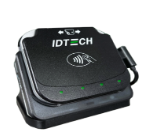
Updated Tap-to-Pay Screen for ApplePay & GooglePay on IDTech VP3550 Devices
Note: This update applies only to the IDTech VP3350 devices and does not affect older swipers or card readers.
Overview
Improved Digital Wallet Payment Experience for Over-the-Counter Transactions
We've updated the payment screen for IDTech VP3350 devices to enhance the tap-to-pay experience for ApplePay and GooglePay transactions.
As part of this update, when selecting a card reader, account staff must choose the USB Reader with Tap Support to enable digital wallet payments.
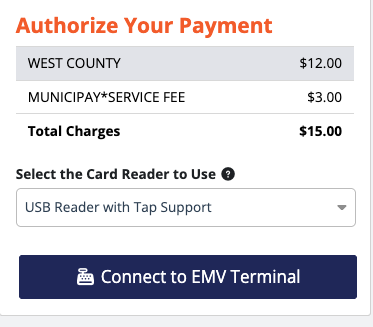
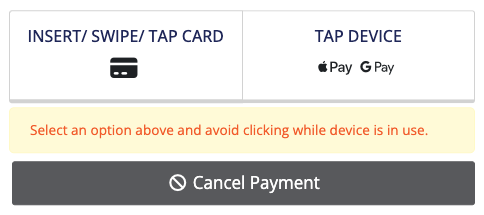
With this update, account staff will notice a change in the payment options displayed. While the Insert/Swipe/Tap Card option remains available for standard card transactions, digital wallet payments are now initiated by selecting Tap Device on the screen to ensure proper processing.
Digital wallet transactions follow a guided tap experience and require multiple taps to complete all payments associated with a transaction. Each tap represents an individual payment processed in the background for the corresponding MID, with onscreen prompts indicating when each tap is required.
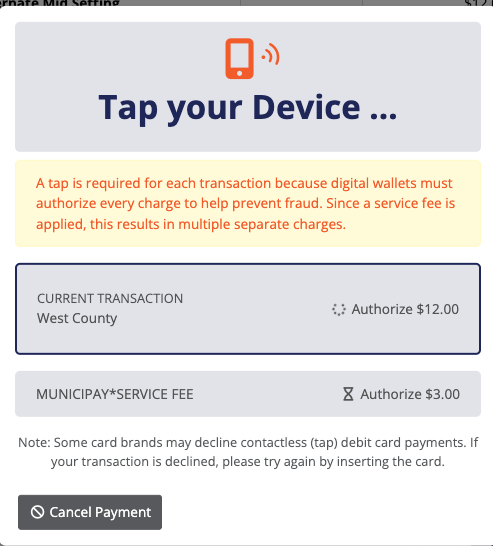
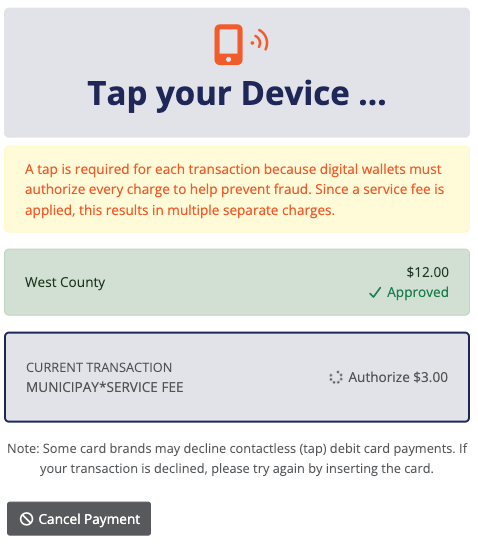
Once all payments are completed successfully, users will be redirected to the receipt page. If any payment fails, the entire checkout will be voided to maintain transaction integrity, allowing the process to be retried.
If the payment screen becomes unresponsive or does not load properly, staff can select Cancel Payment to restart the transaction.
Was this article helpful?
That’s Great!
Thank you for your feedback
Sorry! We couldn't be helpful
Thank you for your feedback
Feedback sent
We appreciate your effort and will try to fix the article